AI SEO Structured Data Blocks
WordPress plugin with AI-optimized structured data blocks for better visibility in ChatGPT, Perplexity, and other AI search engines.
Download Plugin (Free)Core Features
Enhanced SEO
Built-in structured data markup (Schema.org) for all blocks to help search engines better understand your content
Professional Design
Modern, responsive blocks with comprehensive styling options that look great on any device
Easy Customization
Color themes, animations, width controls, and typography options without any coding required
Performance & Accessibility
Clean, efficient code that's WCAG compliant with proper semantic markup and fast loading
Available Blocks
Pro Tip Block
Highlight valuable tips, insights, and advice in an organized, visually appealing format
Standard Features
Custom title and content
Icon selection (Dashicons or Font Awesome)
Color customization (background, text, border, icon)
Animation effects with duration controls
Style presets for quick styling
Width control settings
Key Benefits
Easy for readers to spot important advice
Clear visual hierarchy for better content scanning
Structured format helps bots understand tip content
No coding required for professional appearance
Callout Block
Create attention-grabbing notices, warnings, and important information blocks
Standard Features
Warning and Info style variants
Custom title and description
Icon customization
Color themes and style presets
Animation effects
Responsive design
Key Benefits
Draws attention to critical information
Improved content scanability for users
Clear information hierarchy for search bots
Enhanced user experience with visual cues
CTA Block
Create compelling call-to-action sections to drive conversions
Standard Features
Custom title and description
Button text and URL customization
Background customization options
Icon integration
Multiple style presets
Conversion tracking optimization
Key Benefits
Clear action steps for users
Professional appearance without coding
Better conversion tracking
Structured content for LLM comprehension
Pros & Cons Block
Create balanced comparison sections to help users make informed decisions
Standard Features
Separate pros and cons columns
Custom titles for each column
Color-coded design (green for pros, red for cons)
Bullet point styling
Responsive layout
Balanced comparison structure
Key Benefits
Easy comparison scanning for readers
Structured format for better bot comprehension
Clear decision-making framework
Professional comparison layout
FAQ Block
Create FAQ sections with proper schema markup for rich snippets and voice search
Standard Features
Question and answer format
Expandable/collapsible design
Auto-generated IDs for linking
JSON-LD structured data (FAQPage schema)
Custom styling options
Mobile-optimized layout
Key Benefits
Rich snippet eligibility with FAQ schema
Voice search optimization
Better user experience with collapsible design
Enhanced search visibility
TL;DR Block
Provide quick summaries and key takeaways with multiple presentation styles
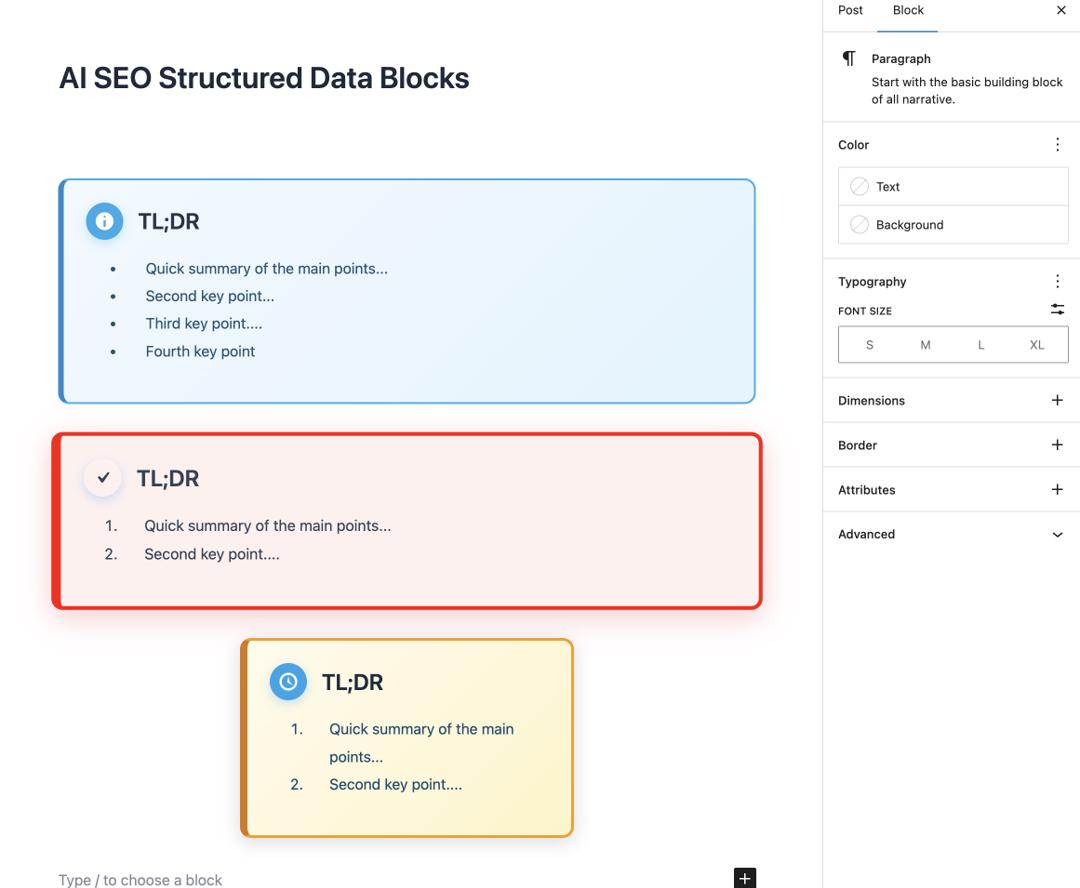
Standard Features
Multiple presentation styles (bullet points, numbered, paragraph, highlights)
Intelligent summary type options
Urgency levels (standard, important, critical)
Custom title (defaults to TL;DR)
Animation effects and typography controls
Width control settings
Key Benefits
Improved content scanability
Better user engagement with quick summaries
Structured format helps LLMs extract key points
Enhanced readability for busy users
Smart Table Block
Create responsive, accessible tables with proper data structure
Standard Features
Pipe-delimited data input
Header row toggle
Striped row styling
Responsive design
Caption support
Accessibility-ready markup
Key Benefits
Better data organization for users
Enhanced accessibility for screen readers
Structured data format for search bots
Mobile-responsive table design
Installation & Usage
Installation Steps
- 1
Download the plugin zip file
- 2
Upload to WordPress via Plugins → Add New → Upload
- 3
Activate the plugin
- 4
Blocks automatically appear in Gutenberg editor
- 5
Start adding structured data to your content
Requirements
WordPress 5.0+ with Gutenberg editor
PHP 7.4 or higher
Modern theme with block support
No external dependencies required
💡 Pro Tip: Blocks appear under "AI SEO Blocks" category in the Gutenberg editor after activation.